Understanding the Basics of 75% Keyboards
In the world of mechanical keyboards, the 75% keyboard layout has carved a niche for itself, offering a perfect blend of compactness and functionality. This layout retains most of the essential keys while omitting the number pad and some extraneous keys, making it ideal for users who seek efficiency without sacrificing important features. When exploring options, 75% Keyboard configurations provide a balance of utility and space optimization that appeals to gamers, typists, and general computer users alike.
What Makes a 75% Keyboard Different?
At first glance, a 75% keyboard may look similar to a TKL (Tenkeyless) keyboard, but it boasts a more compact design that positions keys closer together while still including function keys and arrow keys. This design minimizes the distance the user’s hands need to travel, enhancing typing speed and comfort. The layout often features a staggered arrangement akin to full-sized keyboards but crams everything into a more efficient footprint, which can make a significant difference in desk space.
Key Features and Benefits of 75% Layouts
- Compact Design: Maximizes desk space while keeping essential keys.
- Enhanced Portability: Easy to transport, making it ideal for gamers and remote workers.
- Key Customization: Offers a variety of switch options and keycap designs to personalize your typing experience.
- Reduced Hand Movement: Ergonomic layout reduces strain during extended typing sessions.
Common Misconceptions about Compact Keyboards
Many users may assume that smaller keyboards compromise on functionality, which is a common misconception. While it's true that some number pad functionality may be lost, modern software and keyboard remapping allow users to access these functions easily. Furthermore, the compact design does not hinder performance; instead, it often enhances it by fostering a more streamlined typing experience.
Choosing the Right Components for Your Custom Build
Selecting High-Quality Key Switches
Choosing the right key switches is crucial when building a custom 75% keyboard. Mechanical switches vary widely in feel and sound, with options ranging from linear switches like Gateron’s Oil King, which offer a smooth keystroke, to tactile switches that provide a noticeable bump to ensure the user knows when the key actuation point has been reached. Select switches based on your personal typing style—whether you prefer a quieter switch for office environments or a clicky switch for tactile feedback.
Understanding Keycap Materials and Profiles
Keycaps come in various materials, including ABS and PBT. PBT keycaps are generally preferred for their durability and resistance to shine over time. Profiles also play a critical role in typing comfort; options such as SA, DSA, and Cherry profiles each offer different heights and shapes that can affect ergonomics and aesthetics. The keycap choice can significantly enhance your overall experience, so consider how they feel and look on your custom build.
Recommended Brands and Products for Custom Keyboards
There are several reputable brands known for their high-quality components. Brands like MCHOSE, Sikakeyb, and AULA offer a wide variety of 75% keyboard kits and individual components. Each brand has its unique offerings, so exploring their products can help you find the right mix for your build.
Step-by-Step Guide to Assembling Your 75% Keyboard
Essential Tools and Preparation Steps
Before diving into assembly, gather essential tools such as a soldering iron (if needed), a keycap puller, and a switch puller. Being organized is key; lay out all components, ensuring you have everything at hand to avoid interruptions during assembly. Preparing your workspace will make the assembly process smooth and efficient.
Assembly Process: From PCB to Final Touches
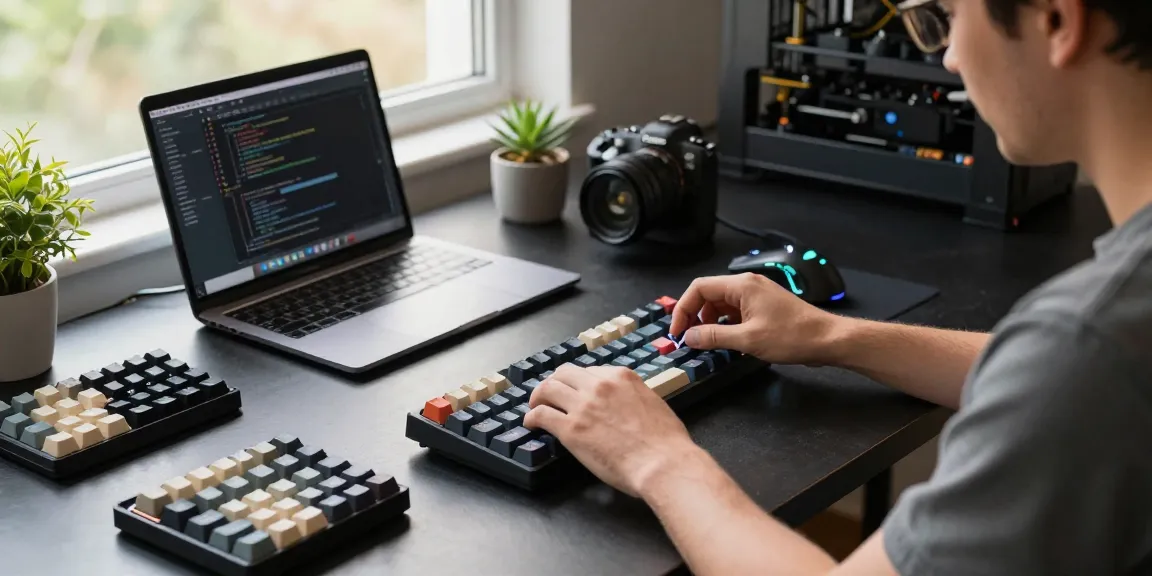
The assembly process of a 75% keyboard typically starts with inserting the switches into the PCB and soldering them in place. If you're using hot-swappable sockets, you can simply insert the switches without soldering. Follow up by placing the stabilizers for larger keys and then mounting the PCB into the case. After securing everything, add your keycaps to complete the build.
Testing and Troubleshooting Your Build
Once assembled, it's critical to test your keyboard to ensure everything works seamlessly. Use keyboard testing software to check for any non-responsive keys. If issues arise, re-check your soldering or switch placement. It's important to troubleshoot at this stage, as resolving these issues early will save time and frustration later.
Enhancing Your Typing Experience
Adjusting Switches for Optimal Performance
Switch customization can enhance your typing experience significantly. Experiment with different springs or lubricants to adjust the resistance and sound of your switches. Finding the right combination can lead to a tactile experience that feels tailor-made for your typing style.
Choosing the Right Keycap Set for Aesthetics and Function
Keycap sets come in a multitude of colors and designs, allowing you to personalize your keyboard's aesthetic. Pay attention to the legends on the keycaps—whether printed or doubleshot—and ensure that they match your layout. A well-chosen keycap set not only enhances the appearance but can also improve visibility and functionality.
Setting Up Macros and Custom Key Functions
Many modern 75% keyboards support programmable keys, allowing you to set up macros and custom functions. This feature can be particularly beneficial for gamers or professionals who rely on shortcuts. Use software provided by your keyboard manufacturer to customize key assignments to streamline your workflow.
Future Trends in Mechanical Keyboards
The Rise of Wireless 75% Keyboards
Wireless technology has made significant strides, and the future of 75% keyboards increasingly features Bluetooth and other wireless capabilities. This allows for greater freedom of movement and reduces desk clutter. Users are gravitating towards these models for their versatility and convenience.
Innovative Features to Look for in 2026
As we move into 2026, expect to see innovations such as customizable RGB lighting, increasingly sophisticated software for key mapping, and even better ergonomic designs. Many manufacturers are focusing on creating keyboards that offer not just function but also aesthetic appeal, incorporating customizable lighting and design options.
Community Insights: What Enthusiasts Are Excited About
The mechanical keyboard community is vibrant, with enthusiasts constantly sharing their experiences and insights. Many are excited about new switch technologies, high-quality materials for keycaps, and the possibility of integrated touchscreens. Keeping an eye on community trends can provide valuable inspiration for your next custom build.
What are the advantages of using a 75% keyboard?
The advantages of using a 75% keyboard include its compact design for more desk space, a blend of functionality and portability, and enhanced typing efficiency due to reduced hand movement. These traits cater well to both gamers and typists alike.
Can beginners build their own 75% keyboard?
Absolutely! With the right guidance, even beginners can assemble their own 75% keyboards. There are plenty of resources available online, and many brands cater to novice builders with beginner-friendly kits.
What types of switches are best for gaming vs. typing?
For gaming, linear switches like Gateron Oil King are favored for their smoothness, while tactile switches are often preferred for typing due to their feedback. Choosing the right switch ultimately depends on personal preference and intended use.
How do I choose the right keycap profile?
Selecting the right keycap profile involves considering your typing style and comfort preferences. Profiles like SA or DSA may offer varying heights and shapes, allowing you to find what feels best for your hands.
What are the most popular brands for custom mechanical keyboards?
Popular brands for custom mechanical keyboards include MCHOSE, AULA, Sikakeyb, and various boutique manufacturers that offer unique components and aesthetic customization.